Locating Form Submissions in Accuro
Locating Form Submissions in Accuro
When a patient completes a form or survey via ACM Alerts or ACM Messenger, the submission is automatically uploaded into your EMR, ensuring your records are up-to-date without manual data entry.
Where to Find Submissions
Once a form is submitted, it is routed directly to their specific medical record. To view the form:
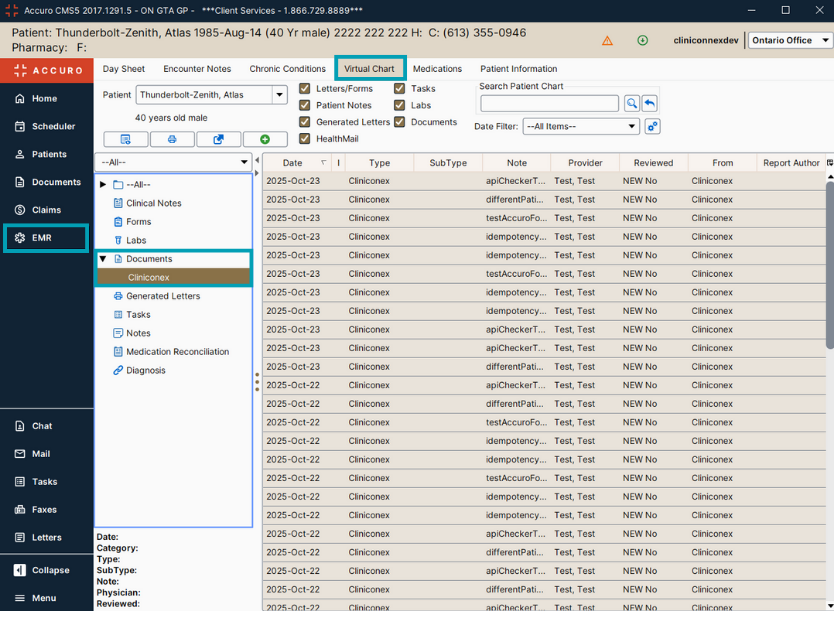
- Open the Virtual Chart of the desired patient
- Navigate to the Documents section
- Look for a folder titled Cliniconex
- The Type is also titled Cliniconex
- While the submission PDF will indicate if an attachment (such as photos or scanned IDs) were included, the files themselves are accessed through the Automated Care Platform (ACP). Instructions for downloading attachments are here.
💡 Tip: Use the search or filter bar at the top of the Virtual Chart to type Cliniconex and instantly retrieve all digital forms submitted by that patient.
Note: Submissions do not automatically populate or update data fields within Accuro. Any changes to the patient’s chart (such as contact info or medical history) must be updated manually by staff.