Release Notes
Release Notes
What’s New | CoreQ Survey Automation in ACS Surveys
Updated September 2026
Run your CoreQ surveys start to finish, automatically
You can now automate your entire CoreQ survey process right inside ACS Forms and Surveys, across all three CoreQ survey types: Assisted Living, Long Stay, and Short Stay. From finding the right residents to sending surveys, collecting responses, scoring them, and filing your results, it can all happen automatically.
Results can be submitted to the AHCA Long-Term Care Trend Tracker, or filed directly with your state if your state requires its own consumer satisfaction reporting. You choose where you report, and we handle the deadline, the file, and the delivery from there.
CoreQ Survey Automation takes the manual work off your plate while keeping a clear, reviewable record of everything.
What’s new
- Surveys that send themselves: Long Stay and Assisted Living surveys go out when you’re ready, and Short Stay discharge surveys go out on their own after each discharge. There’s no roster to maintain — we build the recipient list from your live EHR data every time.
- Reminders and responses handled for you: Reminders go out automatically and responses come back anonymously, with no follow-up needed on your side.
- Scoring and a live scorecard: Responses are scored to the CoreQ methodology as they arrive. Your scorecard shows how a cycle is doing while it’s still open, including whether you’re on track to meet CoreQ’s reporting requirements.
- Filing taken care of, wherever you report: Whether your results go to the AHCA Long-Term Care Trend Tracker or to your own state’s agency, we close the cycle on schedule, build the file that’s required, and file it in the right window.
- Control over every cycle: Pause, resume, or end a collection cycle whenever you need to, and let Short Stay roll into the next cycle automatically.
- A complete, reviewable record: A full history of your survey cycles and everything filed, with any closed cycle available to download as a spreadsheet or a formatted PDF report.
What stays the same
Your existing ACS Forms and Surveys, contacts, and EHR connection keep working exactly as they do today. CoreQ Survey Automation adds to what you already have; it doesn’t replace your other surveys or change how you send them. Surveys go out by text and email. Scoring follows the CoreQ methodology exactly, and it doesn’t change based on where you report; only the file we produce does. Your results are filed under your own facility’s name and identifier.
Frequently Asked Questions
Which CoreQ surveys does this cover?
All three: Assisted Living, Long Stay, and Short Stay. Long Stay and Assisted Living surveys go to current residents and their families; Short Stay surveys go to residents after they’re discharged back to the community.
Where do my results get filed?
Either to the AHCA Long-Term Care Trend Tracker, or directly to your state’s agency if your state has its own consumer satisfaction reporting requirement. You pick which when you turn CoreQ on, and that choice sets your deadlines, your file format, and how results are delivered.
Does this cost extra?
No. CoreQ Survey Automation is included with ACS Forms and Surveys at no additional cost. The surveys count toward your usual send total since they go out by text and email.
Do I need anything special to use it?
You only need an active EHR connection, since survey recipients and discharge information come from your EHR.
Can I see what’s been filed?
Yes. You’ll have a record of your survey cycles and everything that’s been submitted, and you can download any closed cycle as a spreadsheet or a PDF report.
What’s New | Improved Navigation in the Automated Care Platform
June 2026
A simpler, more organized way to get around
Introduction
Your Automated Care Platform now has a new look. We’ve moved the navigation from the side of the screen to the top, so everything is grouped together and easier to find. This change also makes room for new features we’ll be adding to support you in the future.
What’s new
- Everything grouped logically: Find Forms And Surveys and Messaging under Automated Care.
- Reporting made clear: See your form submissions and sent messages under Reports.
- Settings and profile: Reach your account and site settings, plus your user profile, from the Settings gear menu in the top right.
- Clearer labels: In the top left, “Facility” is now “Site” and “Organization” is now “Account.”
What stays the same
All your existing contacts, lists, forms, messages, and settings are exactly where you left them. Nothing has been removed and none of your data has changed, only the way you navigate to it.
Frequently Asked Questions
Do I need to do anything to get the new navigation?
No. The improved navigation is available automatically.
Did my contacts, forms, or messages change?
No. Everything is the same, it’s just organized under new top menus.
Why are “Facility” and “Organization” named differently now?
We’ve renamed them to “Site” and “Account” for clearer, more consistent terminology. They work exactly as before.
Who can I contact if I have questions?
Reach out to the Cliniconex team anytime, we’re happy to walk you through the new navigation.
What’s New | Account Settings Update in ACP
June 2026
Your Settings and Account, where they belong
Introduction
The Settings area in ACP just got a refresh. Organization and facility settings now live cleanly under Settings, while everything personal, your profile, password, and email, has its own home under Account. No more hunting through different pages. You’ll also see a few helpful new controls and self-serve options that used to require reaching out for support.
What’s new
Cleaner Settings menu: the dropdown now clearly separates Settings (for admins) from Account (for everyone).
Decide whether sign-in requires an email at your facility: facility admins can now turn the email-at-sign-in requirement on or off without contacting us.
All of your existing contacts, integrations, send schedules, and saved data are unaffected. Organizational Settings (like consent) behave exactly as before. Toll-Free Registration, Caller ID, and Communication Records Logging are still on the Onboarding Requirements page, they’ve just been reorganized to be easier to find. Nothing has been removed from your workflow.
Frequently Asked Questions
What happens to my current settings?
Everything stays as it is. The toggles and values you’ve already configured carry over unchanged. The pages have been reorganized, not reset.
What’s actually new versus just moved around?
The new pieces are: the Require Email at Sign-In toggle, the Preferred Timezone control. Everything else works the same, just in a cleaner layout.
What’s the difference between the organization view and the facility view of Settings?
If you’re an organization admin, you can change settings that apply to your whole organization. If you’re a facility admin, you can change settings that apply just to your facility. Both views look similar, but they affect different scopes. Non-admins won’t see Settings at all, they’ll just see Account.
Why is Require Email at Sign-In still ON by default?
Some notifications and moderated message flows depend on having an email address on file, so turning the requirement OFF by default could affect those features. We’ve left the default ON, but we’ve made it easy for any facility admin to switch it OFF on the Onboarding Requirements page if it makes sense for that facility.
How do I get this?
This is rolling out to all ACP customers in June 2026. If you have questions or want help configuring the new options for your organization or facility, reach out to the Cliniconex team!
What’s New | Editing A Form After Submission
May 2026
Fix errors or add new information without resubmitting a form
Introduction
When a form was submitted in ACS Forms and Surveys, it used to be locked. If something needed to be corrected or added — a typo in a medication entry, a missing follow-up note, or new clinical details after a patient call — the only options were to resubmit the entire form or contact support. Now, providers can edit a submitted form directly. Original entries are always preserved, every change is captured in a full audit trail, and where EMR integrations are enabled, updates sync to the patient record automatically. Records stay accurate, complete, and up to date — without anyone having to start over.
What’s new
Edit a submitted form: Open any submitted form from the Form Submissions Table, update the answers that need to change, and save. The form does not need to be resubmitted.
Full audit trail: Every edit is captured automatically. The Form Submissions Table now shows Modified By and Modified Date alongside the original submission so you always have a record of what changed, who changed it, and when.
EMR sync on update: For customers connected to a supported EMR integration, edits are uploaded to the patient record automatically. Each save creates a new upload so the chart reflects the latest information.
Configurable permissions: A new “Edit Submitted Forms” privilege lets you decide which user roles can edit submissions. Turn it on for the roles that need it, leave it off for those that do not.
“Leave Blank for Clinical Use” workflows: Build forms with sections intended to be filled in during the patient encounter, mirroring familiar paper-form practice. Providers complete those sections at the point of care and save them straight to the submission.
What stays the same
All your existing forms, submissions, and access controls continue to work exactly as before. Nothing about your current setup changes. Edit permissions follow the user roles you already have in place, and original submitted values are always preserved — edits are tracked alongside the original, never on top of it. If a user cannot see a submission today, they still cannot edit it.
Frequently Asked Questions
Can I edit a form after it has been submitted? Yes. Open the submitted form from the Form Submissions Table, make your changes, and save. The form does not need to be resubmitted.
Will my original answers be lost when I edit a submitted form? No. Original entries are always preserved. Every change is timestamped and tracked alongside the original submission so you have a full record of what changed and when. In the EMR, the original submission is kept and each update is added as a new record.
Will my edits sync to my EMR? If your ACS Forms and Surveys instance is connected to a supported EMR integration, edits will sync to the patient record automatically. Each save creates a new upload. If you are not on an EMR integration, your edits are still tracked within the Form Submissions Table.
Who can edit a submitted form? Anyone whose user role has the new “Edit Submitted Forms” privilege enabled. Existing view and submit access controls still apply — if a user cannot see a submission, they cannot edit it.
Where can I see the edit history? The Form Submissions Table shows Modified By and Modified Date for an audit trail of every change. Each time a form is saved after being updated, a new record is uploaded to the EMR.
Do I need to do anything to turn this on? No. Editing submitted forms is available automatically to all ACS Forms and Surveys users as of the May 2026 release. Your administrator can review the new “Edit Submitted Forms” privilege to confirm which roles have edit access.
Are there any limitations I should know about? A few things to note in this release:
- Signatures and file uploads on a submitted form cannot be edited. You can upload supporting documents directly to the patient record instead.
- Specific EMR fields are not yet updated with edited form information. Form-level updates flow through today; field-level write-back is on the roadmap.
What’s New | Saved Lists in ACM Messenger
May 2026
Save your contact lists once, reuse them anytime
Introduction
Sending messages to your contacts shouldn’t mean re-uploading a CSV every time. ACM Messenger now lets you upload, name, and save multiple contact lists, so you can send to media contacts, volunteers, contractors, prospective residents, or any other group with just a few clicks. Build your lists once, keep them organized, and send targeted messages whenever you need to.
What’s new
Save and reuse contact lists: Upload a CSV, give it a name, and save it. Your list stays available for every future campaign, no more re-uploading the same file.
Organize lists for the whole organization or a single facility: Organization level admins can create global lists that any facility can use. Facility admins can create local lists scoped just to their site. Permissions are enforced automatically.
Map your CSV columns to ACM fields: When you upload, choose how each column maps to ACM’s custom fields. Editable filter labels make it easy to set up exactly the way you want. No template is required.
Filter within a saved list when sending: Select a saved list as your recipient source, then narrow it down further with filters. You can even combine saved lists with your integrated contacts.
What stays the same
All your existing contacts, integrations, and message workflows are unaffected. Saved Lists is an additional option for managing groups outside your EMR. It doesn’t replace integrated contacts, and it doesn’t change anything about how you send to residents or patients today. If you are have contacts integrated through another system (e.g. CRM, HCMS), you can keep using it alongside Saved Lists.
Frequently Asked Questions
Who can see and manage Saved Lists?
Global lists created at the organization level are visible across all facilities with access. Local lists created at the facility level are scoped only to that facility. You can also manage user privileges to decide who has the ability to see, download and send to global lists at each facility.
Does Saved Lists send data back to my EMR?
Saved Lists is designed for communicating with contacts who live outside your EMR (like media, volunteers, or contractors), not as a replacement for integrated contacts, so there is no data sent back to your EMR. If you do use it to reach patients or residents, remember that any updates to those records still need to be made manually in your EMR.
Do saved lists expire?
No. Lists stay available until you remove them, so it’s a good idea to review and update them periodically to keep the data fresh.
How can I access this feature?
Reach out to the Cliniconex team to ask about having this feature turned on for your organization or facility today!
What’s New: Vault Enhancements in ACM Messenger
May 2026
A stronger layer of security for your most sensitive messages
Introduction
When you’re sending a sensitive lab result, a care update, or any message containing protected health information, knowing that only the right person can open it matters. This enhancement to Vault adds knowledge based two-factor authentication to your encrypted message delivery. When you enable Vault, recipients now answer a question pulled directly from their record before they can read what you sent. It’s the next generation of Vault, designed to give you confidence that the right message is reaching the right person, every time.
What’s new
Two-factor recipient verification: Recipients answer a knowledge-based question: last name, date of birth, or postal/zip code, sourced from your EMR before they can access the message. For Senior Care, last name and date of birth are used.
Automatic field fallback: If the first verification field isn’t available in the EMR, Vault 2FA automatically tries the next available field, so deliverability stays smooth even when records are incomplete.
Brute-force protection built in: Recipients have four attempts to verify. After four incorrect answers, a 10-minute timer blocks further attempts, keeping your messages safe from guessing attempts.
Privacy-preserving notifications: The notification email or text shows only the first two letters of the recipient’s first name, confirming who the message is for without exposing identity.
What stays the same
If you’re already using Vault, your existing workflows aren’t going anywhere. Vault 2FA is the next generation of the product you already know with stronger recipient verification layered on top. Your billing model is unchanged. We’ll be transitioning all existing Vault customers to Vault 2FA by July 2026. Your Customer Success team will work with you to coordinate timing that fits your operations.
Frequently Asked Questions
What is Vault 2FA and how is it different from Vault?
Vault 2FA adds an extra layer of identity verification on top of the encrypted messaging Vault already provides. Before recipients can open their message, they answer a knowledge-based question pulled from their record (like date of birth or last name).
What kinds of messages can I send with Vault 2FA?
Vault 2FA supports both single-recipient and multi-recipient sends, and is available via email and text delivery.
What if the recipient can’t answer the verification question?
Recipients have four attempts. After four incorrect answers, they’re locked out for 10 minutes before they can try again. If the EMR doesn’t have the verification information for a recipient, the system automatically tries another available field , and if no fields are available, the recipient is told to contact your facility.
How long can recipients access their Vault message?
By default, Vault messages are accessible for 30 days after sending. Your facility administrator can adjust this in /admin.
Will my existing Vault setup keep working for now?
Yes, and we’ll work with you on a smooth transition to the new Vault features.
What EMRs are supported?
Vault 2FA works with all of our EMR integration partners. It also supports Flexdata and Saved Lists.
How can I access this feature?
Reach out to the Cliniconex team to ask about having Vault turned on for your organization or facility today!
What’s New | Configurable Thank You Page for Message with Rating
April 2026
Personalize what your patients, residents and families see after they rate their experience
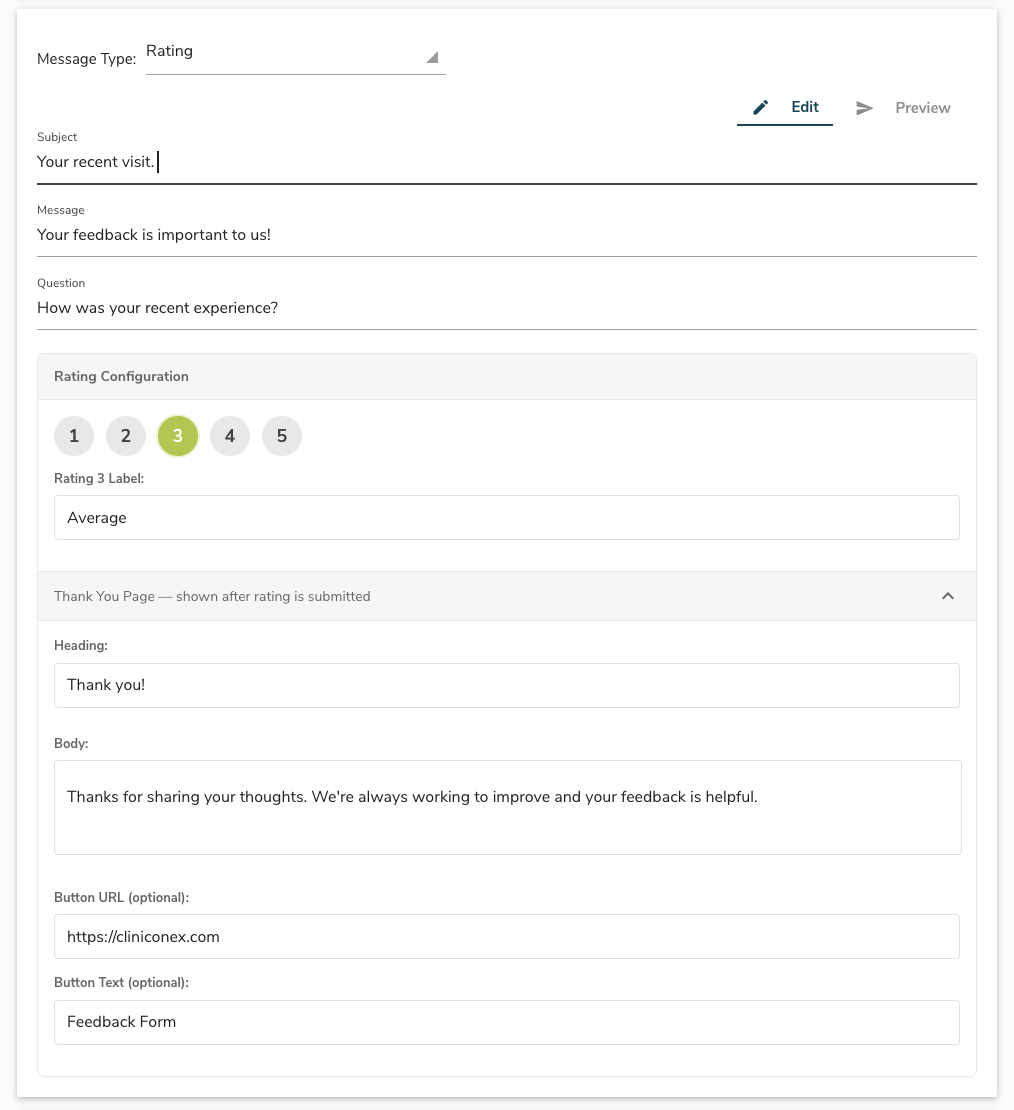
When you send a message with rating, your contacts are asked to rate their experience from 1 to 5 via email, SMS, or phone call. Until now, everyone saw the same generic response after submitting their rating, regardless of what they chose.
Now, you can customize the thank you message for each rating value. Respond thoughtfully to lower ratings with supportive messaging and contact information, and encourage patients who had a great experience to share their feedback with others.
What’s new
- Custom thank you messages per rating: Configure a unique heading, body text, and optional call-to-action button for each rating value (1 through 5). For example, a patient who rates a 1 might see a message with your patient experience line, while a patient who rates a 5 might see an encouraging message inviting them to share their experience.
- Works across all channels: Your custom thank you messages are delivered via email, SMS, and phone call. For voice calls, the system reads back the heading and body text. For email and SMS, you can also include a button with a custom label and link.
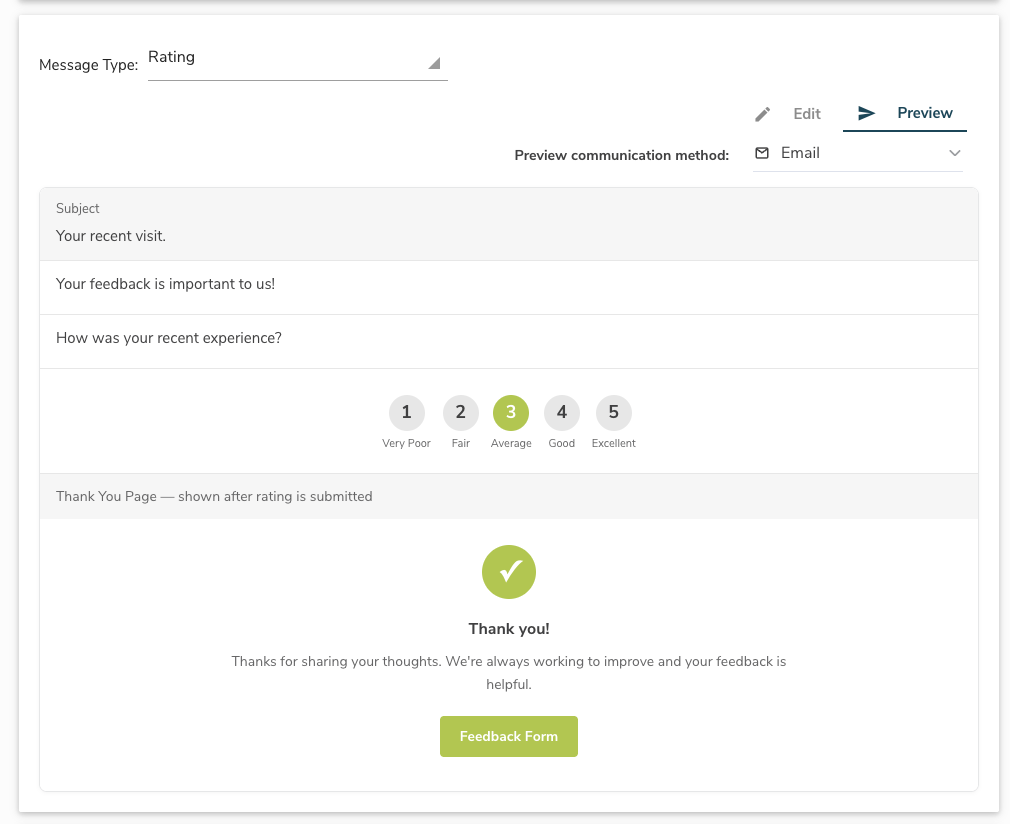
- Preview before you send: A new Preview button lets you see exactly what your patients will experience after submitting their rating. Toggle between ratings and switch between email, SMS, and voice views, all without sending a single message.
- Smart defaults included: Every rating comes pre-populated with sensible default text, so the feature works right away. Customize any or all of the five responses whenever you’re ready.
What stays the same
All your existing messages with rating continue to work exactly as before. The new thank you page configuration is added alongside your current message fields, nothing about your existing setup changes. If you choose not to customize the thank you messages, your patients will see the default responses shown to you in the preview tab.
Frequently Asked Questions
Do I need to do anything to enable this feature?
No. The feature is available automatically for all ACM Messenger users. When you create or edit a message with rating, you’ll see a new “Thank You Page” section in the template editor.
Does this work for email, SMS, and phone calls?
Yes. The custom thank you message works across all three channels. For email and SMS, you can also add an optional button with a link. For phone calls, the system reads back the heading and body text only.
Can I preview what my patients will see before sending?
Yes. Click the Preview button in the message editor to see exactly what the thank you page looks like for each rating value. You can toggle between ratings and switch between email, SMS, and voice previews. You can also use the Test button to send yourself a test message and experience the full flow.
Can I schedule this message to go out as part of an ongoing campaign?
Yes. We recommend using this feature as part of a scheduled campaign, for example, sending a rating message to patients who were seen for an appointment the previous day. This ensures you’re collecting feedback consistently and at the right time.
What if I don’t customize the thank you messages?
That’s fine. Every rating comes with pre-populated default text, so the feature works out of the box. You can customize any or all of the five rating responses whenever you’re ready.
Can I add a button or link to the thank you page?
Yes, for email and SMS. Each rating’s thank you page includes optional fields for a button label and URL. This is great for linking to a feedback form, contact page, or any resource you’d like to share. Buttons are not included in phone call delivery.
What’s New: Automated Bed Hold Notifications in ACM Messenger
March 2026
Bed Hold notifications, simplified
When a resident is temporarily transferred out of your facility — for example, to a hospital — you need to notify families about the transfer and your bed hold policy. Until now, this often meant manually identifying transfers, looking up contacts, and sending individual messages.
With this release, ACM Messenger can handle that for you. Bed Hold notifications are now built directly into the audience filters and are connected to PointClickCare (PCC), so the right people get notified automatically.
What’s new
- New “Transfer | On Leave” filter — A new resident status option is available in the message builder. Select it to target residents who have been transferred or are on leave, based on real-time data from your PCC system.
- Choose specific transfer types — When you select Transfer | On Leave, you’ll see a list of transfer types pulled directly from your PCC setup. Pick the ones that apply, or select “All” to capture every leave event.
- Works across multiple facilities — If your organization has more than one PCC facility, ACM Messenger automatically combines transfer types from all selected facilities into one easy-to-use list.
- Schedule recurring notifications — Set up a daily job to automatically scan for newly transferred residents and send bed hold notifications on a recurring basis.
What stays the same
Your existing messaging setup, contacts, and templates are unaffected. This feature adds a new option to your recipient filters — it doesn’t change how anything else works.
Frequently Asked Questions
Who receives the Bed Hold notification?
Notifications are sent to the contacts associated with the resident in your ACM Messenger configuration, following your existing messaging setup.
What are Transfer Types and how do I know which ones to select?
Transfer types correspond to the leave-related events configured in your PCC system. The options shown in ACM Messenger are pulled directly from your PCC setup, so they’ll reflect the terminology your facility already uses.
What if I have more than one PCC facility?
ACM Messenger will automatically combine the transfer type options from all selected facilities into a single list, so you don’t need to configure them separately.
Can bed hold notifications be sent automatically each day?
Yes. You can set up a daily scheduled job that scans for residents with a relevant transfer status and sends notifications automatically. Note that contacts will receive a notification each time the job runs while the resident’s status remains unchanged.
Do I need to do anything to enable this feature?
If your facility uses PointClickCare and has transfer/leave data available, the new Transfer | On Leave option will appear automatically in your message builder. No additional setup is required.
What’s New — Simpler Message Sending in ACM Messenger
March 2026
Sending messages just got easier
We’ve streamlined the message sending experience in ACM Messenger. Previously, template-saving options appeared alongside the fields for sending a message, which could make the process feel more complex than it needed to be — especially if you were new to ACM Messenger.
Now, sending a message and saving a template are two separate, straightforward actions. You’ll see fewer fields when composing a message, so you can get your message out faster.
What changed
- Cleaner message composer — When you go to send a message, you’ll only see the fields you need. Template options have moved out of the way.
- New “Save as Template” button — A dedicated button at the bottom of the message composer lets you save a template whenever you’re ready — no need to do it at the same time as sending.
- Post-send template prompt — After sending a message, you’ll be asked if you’d like to save it as a template for future use. This makes it easy to build your template library as you go.
- Save templates from the template page — You can also create and manage templates directly from the template page, independent of sending a message.
What stays the same
All the functionality you’re used to is still here. Template fields like category and scope haven’t changed — they’re just accessed through a dedicated modal now instead of being mixed into the send flow. Your existing templates are unaffected.
Frequently Asked Questions
When should I save a message as a template?
Save a message as a template when you plan to send the same or similar message again in the future. Templates let you reuse message content quickly without re-typing it each time. You can save a template from the template page or after you send a message.
Why do I need to give my message a template name?
Template names help you and your team identify the purpose or topic of a message when reviewing reports and message history. A clear name makes it easy to find and reuse templates later.
Has any functionality been removed?
No. Everything works the same as before — only the layout and flow have been updated to make things simpler and faster.
What’s New — AI-Powered Form Creation in ACS Forms and Surveys
March 2026
Create forms faster with AI
Building digital forms just got a whole lot easier. ACS Forms and Surveys now includes two AI-powered tools that take the manual work out of form creation — so you can go from idea to finished form in minutes.
Upload a form you already have, or describe the one you need, and let AI do the heavy lifting.
What’s new
- Upload an existing form — Have a paper form, PDF, or Word doc you’ve been using? Upload it directly into ACS and get an editable digital version in seconds. No more re-entering fields one by one.
- Generate a form from a description — Tell the Form Assistant what you need in plain language — like “create a resident satisfaction survey with a 1–5 rating scale” — and it’ll build a complete form for you to review and refine.
- AI assistance while you edit — The Form Assistant is always available in the form editor. Whether you uploaded a form, generated one, or started from scratch, you can ask it to add fields, restructure sections, or make changes at any time.
- Easier to get started — The upload option is now built right into the “Create a Form” screen, so it’s easy to find from the start.
What stays the same
All your existing forms, templates, and workflows are unaffected. These new tools are additional options for creating and editing forms — nothing about your current setup changes.
Frequently Asked Questions
What file types can I upload?
The uploader supports common formats including PDF, Word documents, JPEG, and PNG. If you try to upload an unsupported file type, you’ll see a message letting you know. Supported formats are also listed in the upload window.
Will my uploaded form look exactly like the original?
The AI does its best to convert your form accurately, but we recommend reviewing the result in the editor before publishing. Field types, labels, and layout may need minor adjustments depending on the complexity of your original document.
Can I use the Form Assistant on a form I built manually?
Yes. The Form Assistant is available in the editor for all forms, regardless of how they were created. You can use it to add fields, restructure sections, or generate new content at any point.
Do I need any special setup to access these features?
No. These features are available to all ACS Forms and Surveys users as of the March 2026 release. No additional configuration is required.
December 2025
PointClickCare (PCC) Integration for ACS Forms and ACS Surveys Submissions: Streamline your documentation workflow with our latest integration. Form and survey submissions sent via ACM Messenger and ACM Alerts now automatically sync to the patient’s chart in PointClickCare, appearing directly in their documents.
Delete Individual ACS Forms and ACS Surveys Submissions: You now have the flexibility to remove specific form submissions, making it easier to clear out test data or entries that are no longer needed. To ensure security governance, we have introduced a specific permission setting for the deletion of submissions. Admins can control which users have the authority to remove data. Visit the help centre to learn how to delete a form.
Export ACS Forms and ACS Surveys Submissions with Attachments in Zip Folders: Manage your data more efficiently with our new export structure. When exporting form submissions that include attachments, the system now generates a zip folder. This ensures all associated files are well-organized and easy to locate. Learn more about how to export and manage your forms and survey data here.
Bitwarden Browser Extension Compatibility: We have resolved a reported issue where the Bitwarden extension caused the Automated Care Platform (ACP) to freeze. Users can now use Bitwarden alongside ACP without performance interruptions.
ACM Vault Message Formatting: We fixed a rendering issue where messages in ACM Vault were appearing as plain text. Vault messages will now display with their intended styling, including functional hyperlinks, perfect for securely sharing links to forms. You can learn more about sending encrypted messages with ACM Vault here.
October/November 2025
ACS Form and ACS Surveys Submission Notification Emails: Stay updated on submissions in real-time. You can now configure email notifications that alert you when a new form is submitted, providing a direct link to a secure page to view the details. Learn how to set this up.
Export ACS Forms and ACS Surveys Submissions in a PDF: You now have an easier way to view forms offline. We have added a dedicated button allowing you to instantly download a PDF copy of any specific form submission to print. See how to download PDF exports.
ACS Forms and Surveys Privileges Refinement: We have introduced more granular controls for better security governance. You now have finite control over permissions for Admins, Managers, and Users for forms, including specific rights to lock/unlock forms, view submissions, export data, and publish forms. Read more about forms privileges.
Accuro Integration for ACS Forms and ACS Surveys Submissions: Eliminate manual data entry for automated workflows. Form submissions sent through either ACM Alerts or ACM Messenger now automatically sync to Accuro and are recorded directly in the patient’s Documents.
ACM Messenger Reports: We have expanded the reporting format to provide a more complete view of your data, including Provider, Patient ID, Location Code, and Appointment Type, and we have corrected the sorting logic. Learn more about ACM Messenger Reports here.
September 2025
2025. ACS. 02 ACS Forms and ACS Surveys
New Product: ACS Forms and Surveys was built to give healthcare organizations and clinics a flexible, compliant tool for collecting and managing digital information.
Who Benefits: Senior care providers, medical clinics, and hospitals by streamlining information collection, improving compliance, and giving patients, residents, families, and staff a simpler, more reliable way to share feedback.
February 2025
2025. ACM. 01 ACM Messenger for Medical
New Product: ACM Messenger for Medical enables clinicians and their teams to reach one, some or all of their patient roster with ease.
Who Benefits: Care teams and patients in primary and acute care settings like family doctors, specialists and hospitals.
2025. ACM. 02 ACM Vault
New Product: Allows ACM Messenger users to send encrypted messages via and two-factor authentication flow for increased privacy and security.
Who Benefits: Providers and patients can confidently send and receive sensitive or confidential information.
2025. ACS. 01 ACS Booking
New Product: Patients can now book with ease online anytime.
Who Benefits: Both patients, who gain convenience and accessibility, and healthcare providers, who improve efficiency and resource management, benefit from online booking.
May 2024
2024.ACM.02 Check SMS Consent Status
New Feature: Check whether a contact has consented to receive text messages.
Who Benefits: All Users. See whether a resident family contact has fully or partially consented, or rejected consent to receive text messages. Respond to their status accordingly.
March 2024
2024.ACM.01 Add New User Button
New Feature: Admins can invite new users via the Add New User Button.
Who Benefits: All Users. Admins can proactively send email invitations to colleagues to log into the system. User then have immediate access – with the correct role and moderation state – without having to wait for approval by an Admin.
More about releases
When will I be able to access new features?
New features and functionalities in Automated Care Messaging are rolled out over a period of time. We alert all users about releases via in-app and external communications.
2023.ACM.06 Recurring Messages
New Feature: Users can schedule a message to be sent on a recurring basis.
Who Benefits: All admins and users with access to Message Options. Set it and forget it with a recurring message. Rather than manually sending the same content, schedule a message to send on multiple occasions or indefinitely on a daily, weekly, monthly or annual basis.
October 2023
2023.ACM.05 Message Assistant
New Feature: Users can leverage AI by writing key points or a rough draft of a message. Then use the prompt buttons or add further instructions to improve content.
Who Benefits: All admins and users. The pressures of writing a well-crafted message are removed as AI does the writing for you. Users can continue to make improvements to messages or return to a previous version.
August 2023
2023.ACM.04 Moderated Messages
New Feature: Role permissions will enable Admins to review messages written by users before they are sent to resident family or staff contacts.
Who Benefits: Administrators. Admins can create workflows to either assign users a review required status, requiring an admin to approve the message before it is sent, or, a reviewer status who can approve, edit or reject a message. This feature enables an organization to add more users to ACM Messenger while maintaining control over content and messaging.
2023.ACM.04 Message Exchange
New Feature: Send a message and request a response back. A dialogue thread is created allowing the sender and receiver to have sustained conversation until the original sender has determined the dialogue is over.
Who Benefits: All admins and users. Senders can request additional information without having to phone or email message recipients. By maintaining control over the length of the back-and-forth dialogue and overall topic, users can limit the access of the resident family member to the care team to specific topics.
May 2023
2023.ACM.03 Scheduled Messages
New Feature: Scheduled Messages give users the ability to schedule a job. There are several options for scheduling:
- Timelapse (set number of days (or hours) in the future)
- Set a specific date and time.
Who Benefits: All admins and users. Rather than send ad-hoc messages, or remember to send time-specific notifications, users can schedule jobs to send messages when it is relevant to the situation or audience (e.g., birthdays, monthly newsletters, incremental discharge wellness check-ins, etc.)
March 2023
2023.ACM.02 SMS Text Consent
New Feature: Collect recipient consent using an automated telephone message. This will be a two-step process that will first ask recipients to consent to receive SMS text messages over the telephone. Once granted, there will be a follow-up SMS text message asking the recipient for confirmation of consent.
This consent is only required once. If refused, future messages will be sent by telephone. Consent via SMS text message can be refused at any time.
Who Benefits: All users new to ACM Messenger as of January 2023.
March 2023
2023.ACM.01 Template Categories
New Feature: An updated Template Library makes it easier for users to select and import default templates to their organizations and facilities. The new Template Category feature will enable users to organize and group their templates by topic or use case, adding and removing templates as they see fit.
Who Benefits: All users. Grouping templates by categories allows users to not only find and manage their templates, but it also provides a cleaner experience. Furthermore, users can now choose from a variety of templates to automatically import to their organization’s library, removing the need to copy and paste templates from the Help Center.
More about releases
When will I be able to access new features?
New features and functionalities in Automated Care Messaging are rolled out over a period of time. We alert all users about releases via in-app and external communications.
October 2022
2022.ACM.07 Message types and reporting
New Feature: Message types enables users to ask questions, survey or poll recipients and follow up with timed reminders based on the recipient’s response (or lack of response).
Enhanced reporting and analytics allows users to view the result of sent messages in-app, and take follow-up action through advanced sorting and filtering functions, while analytics lets users visualize message responses and engagement.
Who Benefits: Any user who wants to enhance the value of a message by providing additional context or information that cannot be expressed in the body of a message.
September 2022
2022.ACM.06 Attachments
New feature: The attachments feature allows users to add attachments to outgoing messages.
Who Benefits: Any user who wants to enhance the value of a message by providing additional context or information that cannot be expressed in the body of a message.
August 2022
2022.ACM.05 Multi-Facility Sends
New feature: The multi-facility send feature will allow users to select and send a message to several or all facilities within an organization simultaneously.
Who it benefits: Any user with access to multiple facilities. The new feature provides a filter allowing users to select more than one facility as the target audience for either resident or staff messages.
June 2022
2022.ACM.04 Message Printing
New feature: New “Printable Version” button has been added to the Sent Message popup within ACM Messenger. It shows a more printable version of the jobs message and provides a convenient print button.
Who benefits:
- Printer-friendly messages are designed to fit on an 8.5″x11″ or A4 sheet and include only the content (plain text and images) of the message, along with relevant message source information.
- Printer-friendly messages that can also be used for electronic storage by printing as a PDF (rather than selecting a printer).
April 2022
2022.ACM.03 Resident Status
New feature: Senior care homes can now send direct messages to targeted contacts with new filters for Resident Status using enhanced Message Options for New, Current and Discharged residents. Additional filters include Waiting List Status, Payer Type and Patient Care Type, Discharge Date and Discharge Reason. You can also find new Resident Status templates available in the Template Library.
Who benefits: Organization and facility administrators, as well as users wishing to segment contacts by Resident Status. Specifically, facilities can now communicate with discharged residents to ensure they are aware they are welcome back to the facility, resulting in:
- Payment to the facility now assured by Medicare; and,
- Eliminating penalties to the home, hospital, etc. (where readmissions/emergency room visits may result in fines).
2022.ACM.02 Direct Messaging
Feature enhancement: Senior care homes can now send direct messages to one or more targeted contacts by using a new Recipient Type filter to select specific individuals by name, as well as Message Options filters for unit name, resident status or resident ID. Homes can also request and manage consent and communication channel preferences by resident and family contacts.
Who benefits: Organization and facility administrators, as well as users who send messages no longer need to remember, should a resident change location (i.e. floor or room), as they can now select recipients by name. Permissions for direct messaging can be set by user-based roles.
Note: A default consent request message is provided in ACM Messenger, and is configurable to suit the needs of the facility
More about releases
When will I be able to access new features?
New features and functionalities in Automated Care Messaging are rolled out over a period of time. We alert all users about releases via in-app and external communications.