Twilio Toll-Free Number Registration
Twilio Toll-Free Number Registration
Cliniconex now requires Twilio Toll-Free Number Registration Information to be completed in Automated Care Platform to ensure reliable and compliant SMS delivery.
This requirement comes from Twilio and applies to all organizations sending SMS messages from a toll-free number. Completing it helps prevent messages from being blocked or flagged as spam.
You can find this requirement in Header Menu > Settings > Onboarding Requirements.
How to Complete the Registration
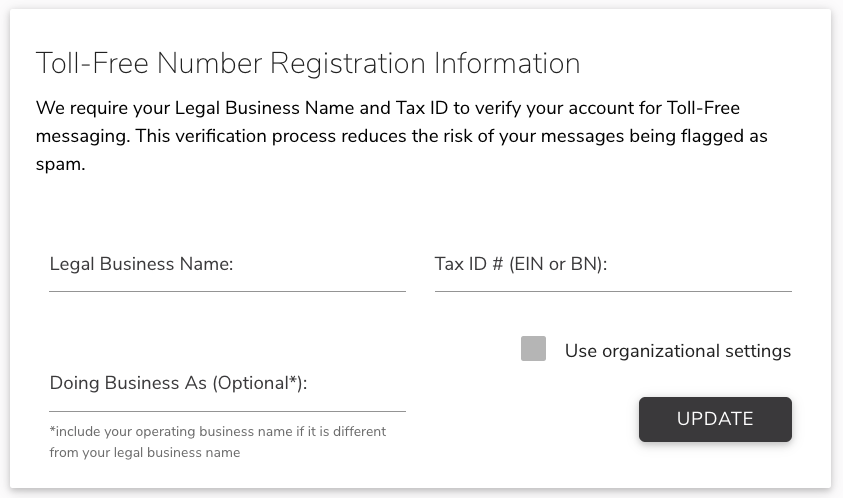
Go to Header Menu > Settings> Onboarding Requirements and locate the Toll-Free Number Registration Information section.
Legal Business Name
Enter your organization’s official legal name as it appears on tax or government records.
Tax ID (EIN or Business Number)
Enter your organization’s tax identification number.
- U.S.: Employer Identification Number (EIN)
- Canada: Business Number (BN)
This information is required by Twilio for verification purposes.
Doing Business As (Optional)
If your organization uses a public-facing or brand name that differs from the legal name, enter it here. If the operating name and legal name are the same, this field can be left blank.
Save
Click Update to save and submit the information.
💡Note:For compliance reasons, this information cannot be updated once submitted. If an update is needed, contact support@cliniconex.com and we’ll help you make the change.